



Managing a file-sharing platform requires a delicate balance between accessibility and control. In a professional environment, a “one size fits all” approach to user permissions often leads to operational friction. Some users only need to view assets, while others require full authority to organize and delete content.
Establishing a clear hierarchy of roles ensures that every participant has exactly the power they need—and nothing more. This progressive permission strategy protects the integrity of the file system while streamlining the workflow for teams and clients.
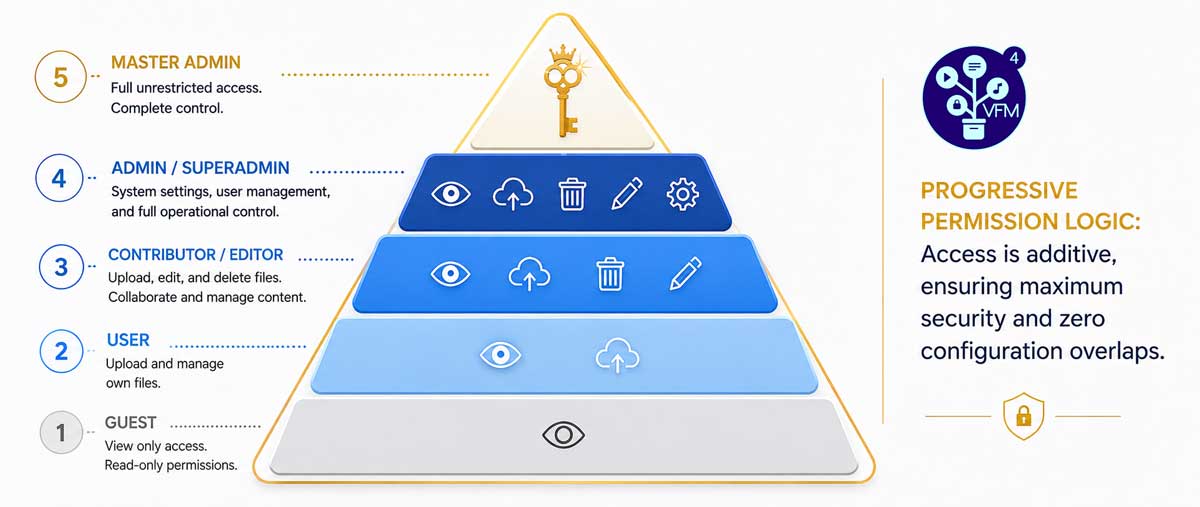
The Spectrum of User Roles
A sophisticated file manager must offer more than just “Admin” and “User” accounts. It should provide a spectrum of roles that match specific business functions.
Veno File Manager (VFM) implements this through a multi-tiered hierarchy, ranging from passive viewers to system architects.
Basic Interaction: Guests and Users
At the entry level, the Guest role provides a secure way to share public assets. Guests can view and download files but cannot modify the directory structure. Moving up, the User role introduces active participation. Standard users can upload their own files and utilize sharing features, making this role ideal for external clients who need to submit documents.
Content Management: Contributors and Editors
For internal staff and trusted partners, the Contributor and Editor roles offer deeper organizational tools. These users can rename, move, and copy files. They also have the authority to create or delete folders. This level of access allows project managers to organize assets without needing full administrative rights over the entire system.
Infrastructural Control: Admins and SuperAdmins
The top of the hierarchy focuses on system maintenance. Admins manage the operational flow of files and users. SuperAdmins go a step further by accessing the core configuration panels, including preferences, appearances, and statistics.
At the very top sits the Master Admin. This is the primary account created during installation. The Master Admin acts as the ultimate fail-safe, holding the exclusive power to define the specific permissions for the SuperAdmin role.
The Power of Configurable Permissions
The true strength of a professional system lies in its flexibility. Roles should not be static. In VFM, permissions are progressive and highly configurable. An administrator can toggle specific capabilities on or off for different roles.
For instance, you might want a “User” who can upload files but is prohibited from sharing them via external links. Or, you may grant an “Editor” the power to move files but restrict them from deleting folders. This granular control allows you to tailor the software to your specific organizational chart, rather than forcing your team to adapt to the software.
Use Case: Managing a Multi-Stakeholder Marketing Campaign
Consider a marketing agency launching a new campaign. This project involves several stakeholders with different needs:
- The Client (User): Needs to upload raw brand assets and download the final deliverables. They should not see the agency’s internal working folders.
- The Freelance Designer (Editor): Needs to organize the “Drafts” folder, move files between stages, and delete outdated versions.
- The Agency Owner (SuperAdmin): Needs to monitor the transfer statistics, manage the branding of the portal, and oversee all user activity.
By assigning these specific roles, the agency ensures that the designer has the tools to work efficiently, while the client remains in a restricted, simplified environment. The SuperAdmin maintains a high-level view of the entire operation without getting bogged down in daily file movements.
Resolving Permission Fatigue
A common problem in digital collaboration is “permission fatigue”—the administrative burden of constantly adjusting individual access levels. A role-based system eliminates this. By defining the rules at the role level, you can onboard new team members instantly. You simply assign them to a pre-configured role, and the system automatically enforces the correct boundaries.
This deterministic approach to access control ensures that your data remains organized and secure. It transforms a simple file repository into a structured professional environment capable of handling complex, high-stakes projects.